LDAP / Active Directory
Connect to your enterprise directory for centralized user management. Supports Microsoft Active Directory, OpenLDAP, and other LDAP-compliant directories.
Overview
LDAP integration provides:
- Centralized user management — Users managed in corporate directory
- Group-based roles — Map AD groups to Anaphora roles
- No password storage — Passwords validated against directory
- Automatic provisioning — Users created on first login
Configuration
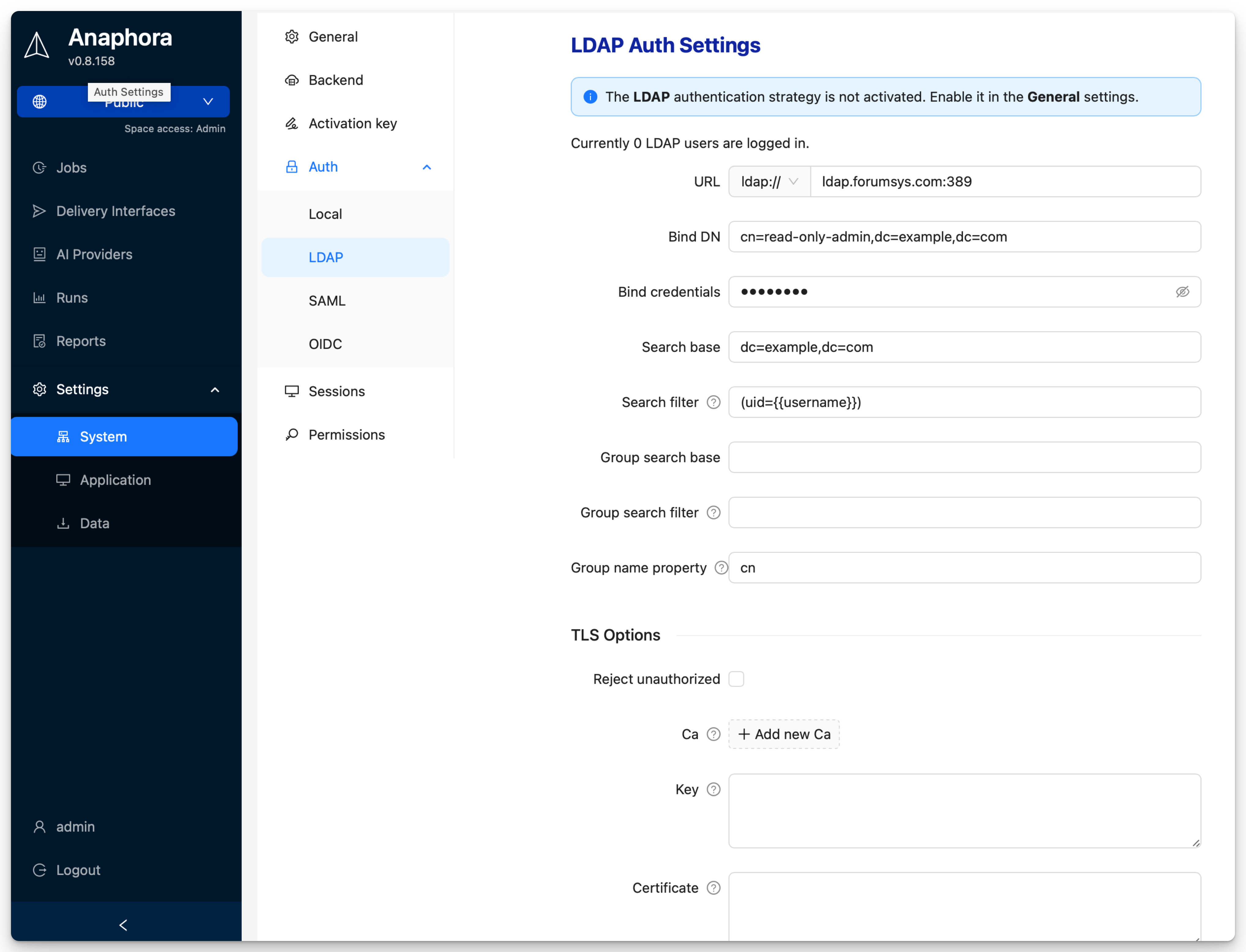
Navigate to Settings > System Settings > Auth > LDAP to configure.
| Field | Description | Example | Required |
|---|---|---|---|
| URL | LDAP server address | ldap://ldap.forumsys.com:389 | Yes |
| Bind DN | Service account for binding | cn=read-only-admin,dc=example,dc=com | Yes |
| Bind credentials | Service account password | (stored securely) | Yes |
| Search base | Base DN for user search | dc=example,dc=com | Yes |
| Search filter | LDAP filter for user lookup | uid={{username}} | Yes |
| Group search base | Base DN for group search | ou=groups,dc=example,dc=com | No |
| Group search filter | LDAP filter for groups | (member={{cn}}) | No |
| Group name property | Attribute for group name | cn | No |
| Reject unauthorized | Enforce TLS certificate checks | false (unchecked) | No |
| CA | Certificate authority | base64-encoded PEM | No |
| Key | Client private key | base64-encoded PEM | No |
| Certificate | Client certificate | base64-encoded PEM | No |
Group to Role Mapping
Use the group search to retrieve LDAP groups and map them to Anaphora roles.
In the group search filter, use {{<attribute>}} placeholders to reference attributes from the login user.
Use the Group name property to specify which attribute will be used as the mapped role name.
SSL/TLS Configuration
For secure connections use LDAPS (port 636):
| Protocol | Port | Security |
|---|---|---|
| LDAP | 389 | Unencrypted (not recommended) |
| LDAPS | 636 | SSL/TLS encrypted |
| StartTLS | 389 | Upgraded to TLS |
Provide CA, Key, and Certificate fields for TLS client authentication if required by your LDAP server.
Active Directory Specifics
Service Account
Create a dedicated service account for Anaphora:
- Create user in AD:
anaphora-svc - Set password to never expire (or manage rotation)
- Grant "Read all user information" permission
- No need for admin privileges
Debug Mode
Enable LDAP debug logging:
- Go to Settings > System Settings > General > General
- Set Log Level to
debug - Reproduce the issue
- Review logs for detailed LDAP communication
Best Practices
- Use dedicated service account with minimal permissions
- Always use LDAPS for encrypted connections
- Test configuration changes in staging first
- Map groups to roles rather than individual user assignments
- Monitor service account for lockouts or password expiration