Features and editions
All editions include the full reporting engine. The higher tiers add team features and integrations.
Get a free trial key. You do not need a credit card, and activation is instant.
Free edition
For evaluation and personal projects.
- Up to 2 scheduled jobs, 2 delivery interfaces and 1 AI provider
- Up to 3 capture actions per job
- Kibana, Grafana, and generic web capture
- PDF report composer with custom layouts
- Email (SMTP) delivery
- Notification throttling and retry policies
- Local user authentication
- Self-Monitoring API: health endpoints for external systems
- AI Analysis: summaries and anomaly detection by an LLM
Best for: trying Anaphora, personal dashboards, small-scale reporting.
In the Free edition, every account is a system user, and Spaces are not available. An install that ran on PRO or Enterprise is an exception: when its licence ends, only its administrators can sign in. When you reach a limit, the interface asks you to upgrade before you add another job, delivery interface or AI provider. A job with more than three capture actions cannot be saved until you upgrade. The server checks these limits for every write, also through the API and for imports.
PRO edition
For production teams that need unlimited jobs and AI providers.
- Unlimited jobs
- Additional delivery: Mailgun, Slack, Webhook, and S3
- Spaces: organize jobs into isolated workspaces
- Priority support: faster response times
Best for: production workloads, growing teams, reports with AI analysis.
Enterprise edition
For organizations that need SSO and compliance.
- LDAP / Active Directory: enterprise directory authentication
- SAML SSO: Okta, Azure AD, OneLogin, and others
- OpenID Connect: Google, Auth0, Keycloak, and others
- Branding: customization of the login screen
Best for: corporate SSO requirements, compliance, large-scale deployments.
Feature comparison
| Feature | Free | PRO | Enterprise |
|---|---|---|---|
| Jobs | 2 | Unlimited | Unlimited |
| Delivery Interfaces | 2 | Unlimited | Unlimited |
| AI Providers | 1 | Unlimited | Unlimited |
| Capture | |||
| Capture Actions | 3 | Unlimited | Unlimited |
| Kibana Connector | ✅ | ✅ | ✅ |
| Grafana Connector | ✅ | ✅ | ✅ |
| Generic Web Capture | ✅ | ✅ | ✅ |
| PDF Composer | ✅ | ✅ | ✅ |
| Delivery | |||
| Email (SMTP) | ✅ | ✅ | ✅ |
| Mailgun | ❌ | ✅ | ✅ |
| Slack | ❌ | ✅ | ✅ |
| Webhook | ❌ | ✅ | ✅ |
| S3 Archiving | ❌ | ✅ | ✅ |
| Team & Organization | |||
| AI Analysis | ✅ | ✅ | ✅ |
| Job Templates | ✅ | ✅ | ✅ |
| Advanced Job Templates | ❌ | ✅ | ✅ |
| Spaces (Multi-tenancy) | ❌ | ✅ | ✅ |
| Branding | ❌ | ❌ | ✅ |
| Authentication | |||
| Local Users | ✅ | ✅ | ✅ |
| LDAP / Active Directory | ❌ | ❌ | ✅ |
| SAML SSO | ❌ | ❌ | ✅ |
| OpenID Connect | ❌ | ❌ | ✅ |
| Operations | |||
| Self-Monitoring API | ✅ | ✅ | ✅ |
| Priority Support | ❌ | ✅ | ✅ |
Activation keys
Anaphora runs in Free mode by default. An activation key unlocks PRO or Enterprise.
How to activate
Option 1, with an environment variable:
docker run -p 3000:3000 \
  -e PUBLIC_URL=http://localhost:3000 \
  -e ACTIVATION_KEY=your-activation-key \
  -d beshultd/anaphora
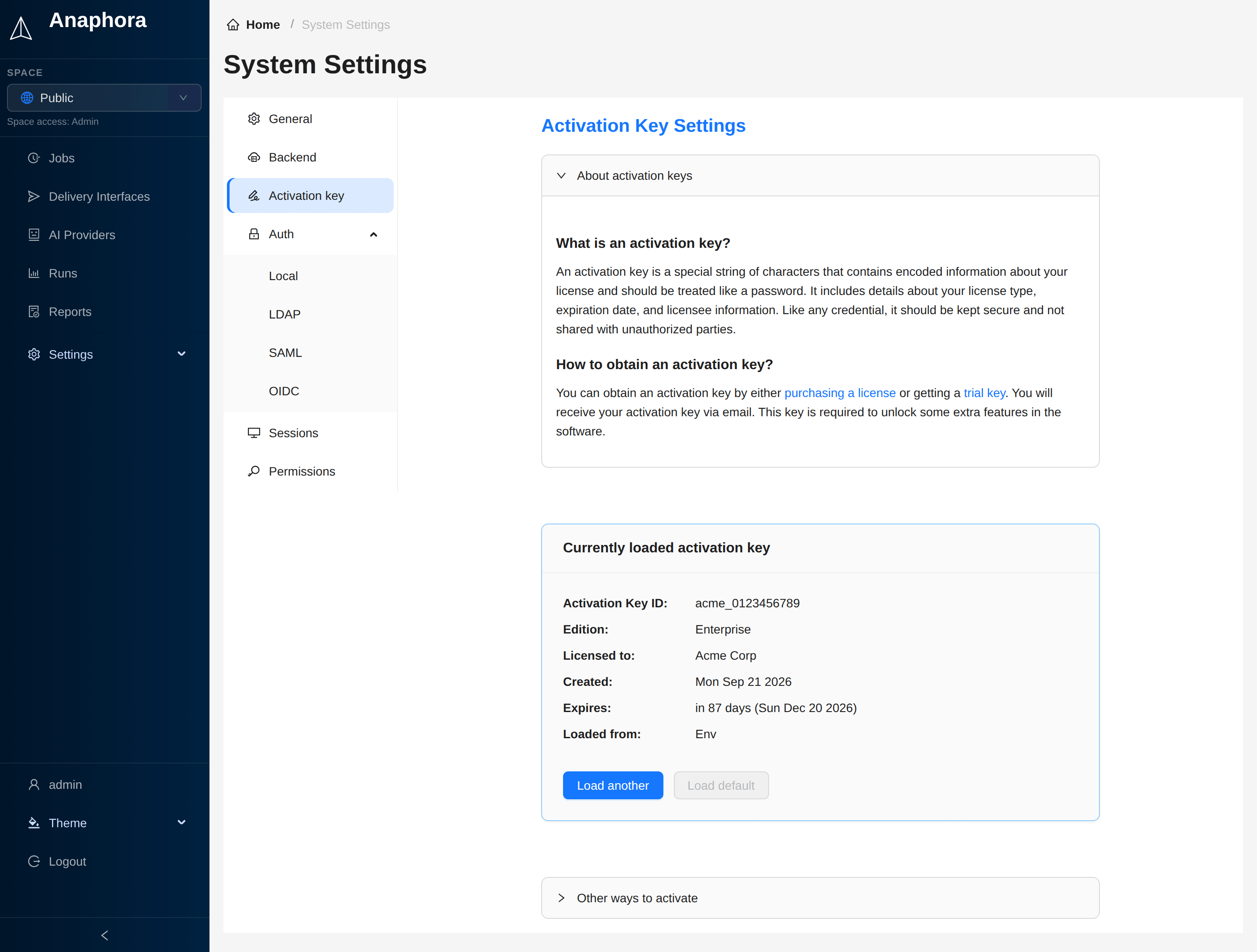
Option 2, in the admin UI:
- Go to Settings > System > Activation key
- Click Load another
- Enter your activation key
- Click Activate
Activation key properties
- Offline validation: no internet connection is necessary
- Perpetual licenses: keys do not expire
- Transferable: you can move a key between deployments
Get your trial key
Request a trial activation key.
- Instant delivery
- Full access to all features
- No credit card required
Need help?
Visit the Anaphora Forum to ask questions, share your workflows, and talk with other users and the Anaphora team.
Next steps
- Installation: get Anaphora running
- Configuration: set up your environment
- Basic Examples: create your first report job